


Getting the Film Look Without Buying Film: A Digital Photography Guide
A convincing film-inspired photo often starts before you open an editing app. If you’ve tried a preset and ended up with an obvious filter effect, you’ve seen why getting the film look without buying film takes more than adding grain or warming the colours.
The look comes from a series of choices: the quality and direction of the light, how you expose the scene, the colours you capture and the texture you add afterwards. You can practise these choices with digital equipment without paying for film and processing every time you shoot.
This guide breaks down the visual ingredients of film-inspired photography and gives you a repeatable capture-and-edit workflow. You’ll learn how to work with light and exposure, shape colour and texture with a lighter touch, and bring a more deliberate pace to digital shooting. Then you can choose a camera for the way you want to photograph, rather than buying into the latest hype. A pre-owned digital camera can be a practical way to experiment. Devices at Used Digital Cameras UK are tested and supplied with a battery, charger and memory card.
Key Takeaways
- For getting the film look without buying film, start with a visual reference and make deliberate choices about light, exposure, colour and texture.
- Adjust exposure to suit the scene and the mood you want. There’s no single setting that works for every photograph.
- Choose between in-camera JPEG controls, editing RAW files or film-emulation tools based on how much control and editing time you want.
- Build a repeatable process, from selecting a reference to reviewing the finished image. Try a 36-photo limit as an exercise in making each frame more intentional.
- When choosing a camera, prioritise handling, JPEG controls, file options and the subjects you photograph over a particular “film look”.
What Does the Film Look Mean in Digital Photography?
Film has an appealing sense of character: colours can feel distinctive, highlights may soften rather than appear stark, and grain can give an image a tactile finish. Digital photography offers a different advantage. You can review a frame straight away, keep a copy of the original file and shape the final image without buying or processing film. Getting the film look without buying film means using that flexibility thoughtfully, not disguising every digital photo with the same effect.
There isn’t one definitive film look. Different film stocks render colour, contrast and texture in different ways, and the same stock can look different under changing light and exposure. A film-inspired digital image is better understood as a combination of visual choices: how tones transition, how colours relate, how much contrast you keep and whether texture supports the scene. The overview of film emulation techniques also shows why emulation involves more than adding grain.
Which visual qualities make a photo feel film-inspired?
Often, it’s the balance of qualities rather than any one effect. Restrained contrast can preserve detail in darker areas, while a gentle transition into bright tones can make highlights feel less abrupt. These choices don’t mean every image must look faded or low contrast. A portrait in soft window light might benefit from subtle tonal changes, while a night scene may need deeper shadows to retain its atmosphere.
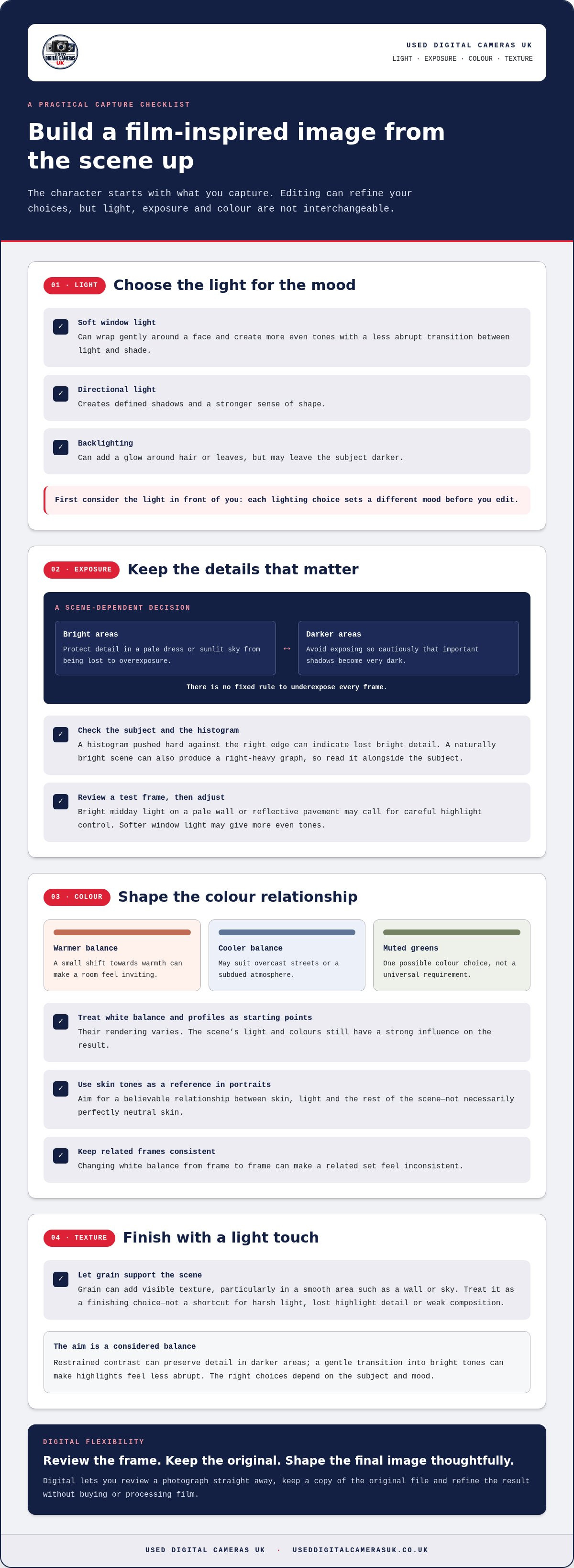
Colour is just as personal. You might choose warm highlights against cooler shadows, muted greens or more natural-looking skin tones, but none is a universal requirement. Grain can add visible texture, particularly in a smooth area such as a wall or sky. It can’t repair harsh light, lost highlight detail or a weak composition, so treat it as a finishing choice rather than a shortcut.
Why does a digital photo sometimes feel too clinical?
Very crisp detail, strong contrast and intense colour can make an image feel polished and immediate. That rendering may suit a product photograph, architecture or a scene where fine detail matters. It can feel less suited to a quieter mood if every edge is sharply defined and every colour competes for attention. The response is subjective, not proof that the photograph is poor.
A camera’s default rendering is only one part of the result. Light, lens choice, focus, framing and later adjustments all shape the image. For example, a carefully composed photograph in soft light can feel gentle even when the camera records plenty of detail. Equally, reducing sharpness or saturation won’t automatically make a scene feel nostalgic if the framing and lighting suggest something else.
Use the effect that serves the subject. Keep clarity where it adds meaning, then adjust tone, colour or texture only where it supports the mood you want. This gives you a recognisable style without forcing every photograph into an imitation of a particular film stock.
How Light, Exposure and Colour Create a Film-Inspired Image
A film-inspired result starts with the light in front of you, not a preset. Soft light from a window can wrap gently around a face, while directional light creates defined shadows and a stronger sense of shape. Backlighting can add a glow around hair or leaves, but it may also leave the subject darker. Each choice sets a different mood before you edit.
The character of a digital image begins with the light, exposure and colour captured in camera. Editing can refine those choices, but it can’t make them interchangeable.
How should I expose digital photos for a film-inspired result?
Think about which parts of the scene matter most. Bright areas that contain detail, such as a pale dress or a sunlit sky, can lose their texture if they’re overexposed. Preserving those highlights may help create a gentler tonal impression. But exposing too cautiously can leave important shadows very dark, so there’s no fixed rule to underexpose every frame.
Check the image on your camera and use the histogram as a guide to where the tones fall. A histogram pushed hard against the right edge can indicate that bright detail is being lost, though a naturally bright scene can also produce a right-heavy graph. Consider the subject as well as the display. In bright midday light, a pale wall or reflective pavement may need careful highlight control. Beside a window, softer light may give you more even tones and a less abrupt transition between light and shade. Review a test frame, then adjust exposure to suit the details you want to retain.
How do white balance and colour affect the mood?
White balance influences whether neutral areas appear warmer or cooler. A small shift towards warmth can make a room feel inviting, while a cooler balance may suit overcast streets or a subdued atmosphere. Treat the camera’s white-balance options and colour profiles as starting points, not guaranteed film simulations. Their rendering varies, and the scene’s own light and colours still have a strong influence on the result. For a clear introduction to the science of colour in photography, consider how light and colour temperature affect what the camera records.
Use skin tones as a useful reference in portraits, but don’t assume they must look perfectly neutral. The aim is a believable relationship between skin, light and the rest of the scene. A warm-lit face may naturally look warmer than a nearby white wall. When photographing a related set, keep your colour decisions consistent: changing white balance from frame to frame can make images feel disconnected. If the light changes, adjust with intention, then compare the photographs together.
Practising these choices with a camera that suits your preferred way of shooting can help you develop a consistent approach. If a tactile, retro style appeals, browse retro digital cameras as one possible starting point.
In-Camera Settings, Editing or Film Emulation: Which Route Fits?
You don’t need specialist software or a new camera to begin. Try the colour, contrast and sharpness controls on the equipment you already own, then make a few basic adjustments in an editor if you want more control. The right route depends on whether you value speed, flexibility or a consistent look across a series.
In-camera settings shape the image as you capture it; post-processing gives you more room to refine the recorded file afterwards.
| Approach | Control and flexibility | Convenience | Best suited to |
|---|---|---|---|
| In-camera JPEG | Moderate; adjustments depend on the camera | High; files are ready to share | Photographers who want a consistent look with minimal editing |
| RAW editing | High; tone and colour can be adjusted after capture | Lower; files need processing | Photographers who want room to refine each image |
| Emulation tools | Varies; profiles can give a repeatable starting point | Moderate; depends on the software and workflow | Photographers seeking a particular, repeatable treatment |
Are in-camera JPEG settings enough?
They can be. Adjusting colour, contrast and sharpness in the camera may give you a pleasing JPEG straight away. This is useful for everyday photography or a project where you want images ready to view without editing each file. If you’re photographing a set, keeping those choices steady can help the pictures feel connected.
Controls and their effects vary by camera, so take a few test frames and compare them. A camera profile can suggest a particular mood, but it isn’t an exact reproduction of a film stock. JPEG files are processed and compressed in camera, leaving less room for substantial changes later than a RAW file usually offers. That doesn’t make JPEG the wrong choice; it simply suits a quicker, more settled workflow.
When does editing or film-emulation software help?
Editing can give you more control after capture. You can adjust tonal balance, shift colour relationships and add grain in measured amounts, while keeping an original file to revisit. RAW files generally offer greater flexibility for these changes, though the finished result still depends on the light and exposure at capture.
Dedicated emulation software is optional. It may help if you want repeatable profiles or a starting point based on a particular kind of film character, but a preset can’t make every photograph convincing by itself. Check its effect on skin, highlights and shadow detail, then adjust it to suit the image. For getting the film look without buying film, start with the equipment and editing tools you have. Add another tool only when it solves a clear creative need.
If you’d like to experiment with a different camera-handling experience, explore pre-owned digital cameras as one possible route. The camera matters, but your settings and choices remain central to the result.
A Repeatable Workflow for Getting the Film Look Without Buying Film
A simple process helps you make a considered set of photographs rather than applying the same effect to every frame. Keep the original files, make small changes and check how the images look together. That makes it easier to spot which choices are working and repeat them on your next shoot.
How do I plan and capture a consistent set of images?
- Choose a reference mood. Before shooting, decide what you want the photographs to feel like. Pick a clear direction, such as muted colour, soft contrast or a warmer overall tone. A reference image can help you judge the result, but use it to guide your choices rather than copy every detail.
- Look for light that suits the mood. Soft window light can work well for a quiet portrait, while angled light can add shape and shadow to a still life. Move around your subject and notice how the light changes across the frame. A different position may improve the image more than a later edit.
- Compose with intention. Decide what belongs in the frame and what can be left out. A simple background can keep attention on a person or object, while a wider composition can give a scene more context. Don’t rely on grain or colour adjustments to make an unclear composition feel deliberate.
- Keep capture choices steady. For a related series, use a consistent approach to exposure and white balance where the light allows. Review a test photograph on the camera, paying attention to bright areas and the subject’s colour. If the lighting changes, adjust as needed, then keep track of the change so the set still feels coherent. To practise slowing down, try limiting a photo walk to 36 frames and make each one count.
How should I finish and review the images?
- Make a restrained first edit. Begin with broad tonal adjustments, such as easing contrast or lifting shadows slightly, then assess the image again. Change colour gradually rather than shifting several controls at once. This helps you understand what each adjustment contributes.
- Check colour and texture. Adjust warmth or saturation only as far as the scene can support. If you add grain, start subtly and view the photo at its normal size. Texture should complement the subject, not become the first thing you notice.
- Compare versions side by side. Look at the original and edited image next to each other, then compare the rest of the series. Ask whether contrast has become too strong, colours too intense or grain too obvious. If an adjustment distracts from the subject, reduce it or remove it. A short pause before this review can also help you see the image more clearly.
Consistent practice matters more than a particular camera effect. If a tactile approach appeals, you can explore retro digital cameras as one way to experiment with how you shoot. Keep your workflow simple, and refine it as you discover which choices best suit your photographs.
Choosing a Digital Camera for a Film-Inspired Style
A camera can influence the starting point, but it can’t create a complete style on its own. Light, composition, exposure and editing have more influence than buying a camera solely because it looks retro or promises a particular mood. For getting the film look without buying film, choose equipment that makes your preferred way of photographing comfortable and repeatable.
Start with the photographs you want to make. Portraits, street scenes, travel pictures and still lifes can call for different handling, focusing and framing choices. A camera that feels intuitive in your hands is more likely to encourage you to slow down, notice the light and make deliberate frames. Those habits can matter more than a particular menu setting.
What should I look for in a pre-owned digital camera?
Think about how you want to capture and finish your images. If you prefer pictures that are ready to share, JPEG controls for colour, contrast and sharpness may suit your workflow. If you like making detailed adjustments afterwards, look for a camera that offers RAW files. RAW gives you more flexibility in editing, while JPEG is convenient but leaves less room for extensive changes. Options vary, so consider the camera’s controls and menus as part of the decision.
Handling matters, too. Consider whether the buttons and menus feel straightforward, whether the camera is comfortable to carry, and whether its approach to focusing and framing suits your subjects. If you’re drawn to the design and experience of older digital equipment, explore retro digital cameras as one possible route. A pre-owned camera can be a practical way to experiment without treating a new purchase as a shortcut to a finished look.
Can a vintage digital camera help create a film-inspired style?
It can offer a different starting point. Older digital cameras may render detail, colour or contrast differently from newer equipment, and those characteristics might appeal if you want a less contemporary feel. But age alone doesn’t recreate film. The result still depends on the scene, the light, how you expose and compose the photograph, and any editing choices you make.
Set expectations around what you want the camera to do. A distinctive in-camera rendering can be enjoyable, but it may not suit every subject or match the look you have in mind. Your personal taste matters more than chasing a particular era or technical specification. Explore vintage digital cameras if their character interests you, while keeping your photographic approach at the centre of the decision.
Every pre-owned camera sold by Used Digital Cameras UK is tested and supplied with a battery, charger and memory card. If you’re ready to try a different way of shooting, browse the retro and vintage camera categories and choose a camera that fits your subjects, handling preferences and editing habits.
Make Your Next Frame Your Own
Your film-inspired style doesn’t need to be settled before you start. Choose one quality to explore, perhaps softer contrast or a warmer colour balance, and let your next photo guide the choices that follow. Over time, those small decisions can become a personal approach rather than a look copied from a preset. That’s the creative reward of getting the film look without buying film: you can experiment, review and refine at your own pace.
If a different camera would help you explore that process, consider a pre-owned digital option that suits the way you like to photograph. Used Digital Cameras UK has operated online since 2003 and offers free UK shipping. Explore tested pre-owned digital cameras and find a practical starting point for your next set of images.
Keep experimenting, trust your eye and enjoy the photographs you make along the way.
Frequently Asked Questions
Can I get the film look with a smartphone?
Yes, a smartphone can make film-inspired photos through thoughtful lighting, composition, colour adjustments and optional editing. Results depend on the phone’s camera and how it processes images, so one filter won’t guarantee a convincing effect. Try photographing the same subject near a window and outdoors, then make a small colour adjustment to one version. Judge the whole photograph, including its mood and tones, rather than deciding by grain alone.
Is film grain necessary for a film-inspired digital photo?
No, grain is optional, and film stocks don’t all have the same texture. A clean image can still feel film-inspired through its colours, tones and composition. Grain also can’t fix unsuitable light, colour or contrast. If you add it, start with a subtle amount and check the photograph at the size you’d normally view or share it. Remove or reduce the effect if it competes with the subject or looks over-processed.
Can I create film-like photos without editing software?
Yes. You can shape the result while taking the photograph by choosing a considered viewpoint, watching the light and using any image settings already available on your camera. Editing can offer more control, but it isn’t essential for experimenting. Learn one or two of your camera’s colour or contrast options first. Photograph the same subject in different light, then compare the results to see which capture choices suit your taste.
Does shooting RAW make a digital photo look more like film?
No, a RAW file doesn’t create a film aesthetic on its own. It retains more flexibility for later adjustments than a finished JPEG, which can be useful if you want to change colour or tone after a shoot. The look still depends on the exposure and your editing decisions. If you’d rather have a ready-to-view image with less processing, JPEG may fit your workflow better.
How can I make digital photos look less over-edited?
Reduce the strength of colour, contrast and texture adjustments, then take a short break before reviewing the image. Check whether the subject still feels natural and whether the mood is clear without the edit calling attention to itself. Compare the finished version with the original. If an adjustment makes skin, skies or other important tones distracting, undo it or lower its intensity until the photograph feels balanced.
Can an older digital camera take film-inspired photos?
Yes, an older digital camera can be part of a film-inspired workflow, but its age alone won’t recreate film. Its controls and image rendering may shape your starting point, while the subject, lighting and exposure influence each frame. Think about whether its handling suits the way you like to photograph. Treat an older camera as a creative option, not a shortcut that guarantees a particular look.
What is the easiest way to start getting a film look without buying film?
Start with one clear reference, such as a photograph with subdued colours, then try to create a similar mood with a subject you can revisit. Keep the framing similar as you test small colour or contrast changes, so you can tell what affects the result. This simple comparison makes getting the film look without buying film easier to learn. Use your current equipment first, then decide whether another camera would genuinely suit your photography.