


How to Test a Second Hand Camera Shutter for Consistent Operation
If you're learning how to test a second hand camera shutter, compare its 1/1000s, 1/500s and 1/250s settings, then repeat each test 7 times to assess consistency. The 1/1000s setting should behave faster, but this rough check can’t confirm exact shutter timings.
A shutter can fire and still be inaccurate, so don’t judge it only by sound or whether the camera takes a picture. Look for inconsistent results, sluggish responses and light passing through the shutter curtains. This guide explains how to compare speeds, inspect for light leaks, repeat and record tests, and recognise signs of wear. Knowing how to test a second hand camera shutter also means understanding what these checks can and can’t tell you, so you can make a more informed judgement about the camera’s condition.
Key Takeaways
- Compare 1/1000s, 1/500s and 1/250s to see whether faster settings behave as expected, but treat this as a rough check rather than a timing measurement.
- Turn off the flash for an indoor test, and inspect vintage shutter curtains for gaps when closed and at the end of the cycle.
- Repeat each setting several times and record the results; a deviation within 1/3 of a stop is typically considered acceptable.
- Listen for uneven timing and test the Bulb setting: the shutter should stay open while you hold the release and close when you let go.
- Build a useful condition record by noting shutter behaviour alongside sensor cleanliness, impact marks and scratches.
Checking faster shutter speeds by observing light
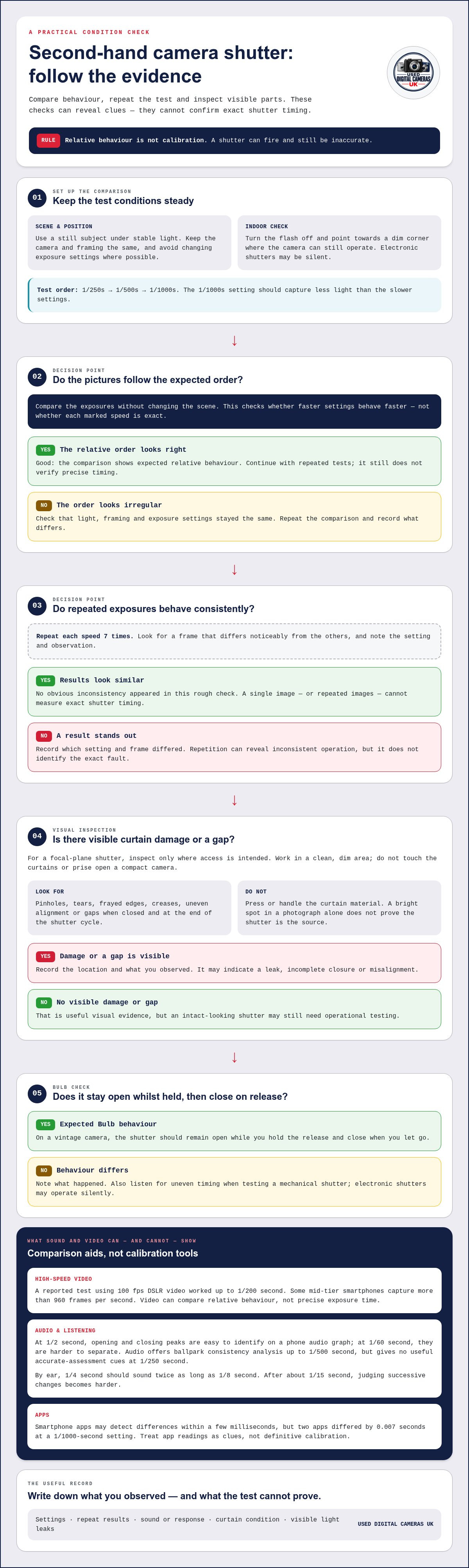
A visual comparison can show whether faster settings behave in the expected order, but it can’t confirm exact timings. To learn how to test a second hand camera shutter, compare settings under steady light and record what you observe.
To compare results, keep the camera in the same position and avoid changing exposure settings where possible. Electronic shutters may operate silently, so listen only when testing a mechanical shutter or a camera with a genuine mechanical action.
- Choose a steady test scene. Use a still subject under stable lighting and keep the camera in the same position. For an indoor test, turn off the flash and point the camera towards a dim corner where it can still operate. Avoid changing the framing or light between exposures, as either can affect what you see.
- Compare faster settings. Take a picture at 1/250s, then 1/500s and 1/1000s, keeping other exposure settings unchanged where possible. The 1/1000-second setting should capture less light than 1/500s and 1/250s. This checks the order of operation, not whether each speed matches its marked value.
- Repeat each setting. Make 7 exposures at each speed and look for a frame that differs noticeably from the others. Repetition helps reveal inconsistent operation and reduces the influence of an unusual result. Note the settings and observations; a single image can’t measure shutter timing.
- Try high-speed video as a comparison aid. A reported test using 100 fps DSLR video worked up to 1/200 second, while some mid-tier smartphones capture high-speed video at more than 960 frames per second. Film the shutter action in good light and compare settings. Video can show relative behaviour, but not precise exposure time.
- Use audio for slower exposures. A phone audio graph can make the opening and closing peaks of a 1/2-second exposure easy to identify. At 1/60 second, the peaks are still identifiable but harder to separate. Audio offers ballpark consistency analysis up to 1/500 second; at 1/250 second, it provides no useful cues for accurate assessment.
- Compare by ear and treat apps cautiously. On a vintage camera, compare 1/4 second with 1/8 second: the longer exposure should sound twice as long. After about 1/15 second, judging successive changes by ear becomes harder. Smartphone apps can detect differences within a few milliseconds, but two apps differed by 0.007 seconds at a 1/1000-second setting. They offer clues, not definitive calibration.
For anyone asking how to test a second hand camera shutter without specialist equipment, light comparisons, repeated trials and sound can reveal consistent behaviour. They can’t verify exact timing; a rough test shows whether the camera works, not whether its speeds are accurate.
Inspecting shutter curtains for light leaks
On a camera with a focal-plane shutter, inspect the curtains for pinholes, tears, uneven edges and gaps. Before release, they should be fully closed; at the end of the shutter cycle, they should meet without a gap.
- Prepare the camera safely. Switch it off before removing a detachable lens, then work in a clean, dim area. If the camera has a manual back, open it only as intended and avoid touching the shutter curtains. A compact camera may not provide safe access to its shutter mechanism, so don’t prise open its casing.
- Look for damage before operating the shutter. With the back open, examine the visible curtain surface against a steady light. Check for pinholes, frayed edges, creases or areas that appear out of line. A mark on the curtain deserves attention, but don’t press it to decide whether it is a hole. Touching delicate material can change its position or cause damage.
- Check the closed position. Before releasing the shutter, look for a continuous closure across the visible frame. The curtains should meet without a gap. A bright point of light visible through the curtain can indicate a leak, while a gap along an edge may suggest incomplete closure or misalignment. Record exactly where you see it, such as the centre or one side.
- Watch one complete shutter cycle. Set the camera to a slower exposure or Bulb mode if available, then release it without touching the curtains. On a vintage camera’s Bulb setting, hold the release to keep the shutter open and let go to close it. Observe whether the curtains travel smoothly and meet at the end. Stop if movement appears to snag or stall.
- Repeat the visual inspection after release. Confirm that the curtains return to a fully closed position, with no visible gap. A camera that closes unevenly on one cycle may behave differently on another, so repeat the observation and note any change. Don’t use repeated firing as a reason to handle the curtain material directly.
- Separate a curtain leak from other faults. A light leak in a photograph can also come from a damaged back seal or another opening, not just the shutter. Compare the location of the mark in images with what you saw inside the camera. Keep the observations distinct: visible curtain damage is evidence, whilst a bright patch in a picture alone doesn’t identify its source.
These checks can reveal visible damage and closure problems, but not precise exposure timing. Keep the inspection manual and non-invasive. A shutter that looks intact may still need operational testing.
Repeating shutter tests to assess consistency
To check whether a camera shutter fires reliably at all speeds, test every marked setting and repeat each exposure under the same conditions. Record each result separately. Repeated behaviour can reveal inconsistency, but it doesn’t establish exact timing.
- Choose a stable test setup. Mount the camera on a tripod or rest it securely, then aim at an evenly lit, still subject. Use manual exposure so the camera doesn’t alter aperture or ISO between frames. Keep the lighting and framing unchanged throughout each set of trials.
- Work through every shutter setting. Starting with the slowest available speed, trigger the shutter once at each marked setting. Continue through the faster speeds, including intermediate settings if the camera offers them. Check that each setting fires and returns to ready, rather than testing only the fastest and slowest options.
- Repeat each setting consistently. Make 7 trials at each speed, with the same camera position and exposure conditions. Leave a short pause between releases so you can notice any hesitation or failure to reset. If a DSLR mirror moves during each exposure, distinguish its sound from the shutter’s action.
- Compare results within each group. Review the 7 images or, with a film camera, observe each release and listen for missed or irregular cycles. Look for a frame that is unexpectedly brighter or darker than its group. Changing light, movement or automatic exposure can affect images, so keep those factors controlled before attributing variation to the shutter.
- Record the setting and each observation. Make a simple table with the marked speed, trial results and any visible or audible irregularity. If you have the camera maker’s stated specification, note the observed deviation beside it. A shutter deviation within 1/3 of a stop is typically considered acceptable, but a basic visual comparison cannot confirm precise timing.
- Repeat any suspicious result. If one exposure differs sharply, repeat that setting under the same conditions before drawing a conclusion. Then test the settings on either side. For example, compare 1/500s with 1/250s and 1/1000s to see whether the behaviour changes progressively or appears isolated.
Consistent firing means the camera releases and resets at each selected speed, with similar behaviour across repeated trials. Repeatability matters more than one successful frame. Record any variation that persists across trials in your condition notes.
Repeated trials make your comparison more reliable, so don’t base your assessment on a single release. Link each result to its shutter setting and note any differences from the official specification, if available. This helps distinguish recurring behaviour from a one-off irregularity and creates a clear record for later comparisons.
Diagnosing worn shutter components
Pair a shutter-count check with operational tests: the count reflects recorded use, while testing shows how the mechanism behaves now. No single figure proves the shutter’s condition.
-
Check the shutter count
Look up the camera’s shutter count using a compatible count-reading programme, and record the figure beside the model. A count estimates recorded actuations, not remaining life: many modern cameras are rated for at least 100,000, yet a particular camera can fail after 17,000 while another works after 76,000. Treat the number as context, not a pass-or-fail result.
-
Assess mechanical shutter condition
Set a vintage camera to Bulb, press and hold the release, then let go. The shutter should remain open while you hold the release and close when you let go. Listen for hesitation and watch for incomplete movement, but don’t touch the curtains. Repeat at a slow setting, then compare the response with faster settings.
- Compare indoor and outdoor behaviour. Test the same camera in bright daylight and a dim indoor setting, choosing settings that allow it to operate. The shutter should respond to the change in light. If its behaviour appears unchanged in both conditions, record that as a possible sign of a problem. Note the setting and your observations for each test.
- Check slow exposures against their expected duration. At 1/8 second, the shutter should remain open for 125 milliseconds. Compare the 1/2-second setting with 1/4 second by ear: the longer exposure should sound longer. A marked difference between a setting and its expected behaviour helps identify which speeds need closer attention.
- Look for a pattern across speeds. A significant delay at faster speeds alongside consistent slow exposures can indicate worn tension springs rather than an electronic sensor fault. Note whether the issue occurs only at the fast end or across the range. A pattern is more informative than one failed exposure.
- Put the count in context. A professional photographer may take 20,000 or more photographs in a year, whilst someone photographing only on holiday may take about 1,000. Compare the recorded count with the camera’s age and visible condition, but remember that a shutter can fail before its rated life or keep working beyond it.
- Separate diagnosis from repair. A shutter can be replaced, usually for less than the cost of a new camera body. Don’t attempt a home repair on an era-specific point-and-shoot, even if you’ve repaired cameras before. Keep your count, test notes and observed symptoms together as a condition record.
Documenting second-hand camera condition
A useful condition record connects each shutter observation with the camera’s physical state. Note the settings tested and results, along with sensor cleanliness, impact marks and scratches.
- Identify the camera and test setup. Record its make and model, the lens fitted, and whether the shutter is mechanical or electronic. Note the lighting and exposure mode used, because changing those conditions can affect image comparisons. Give each test a date and label, such as “indoor shutter check”, so you can match the notes to the right files.
- Log the shutter results by setting. Make a row for each marked speed and write down whether the camera fired, reset and produced a consistent result. Record observations rather than impressions: for example, note “one frame visibly brighter than the others” instead of “shutter seems poor”. If you compared the result with a maker’s specification, record that reference beside your observation.
- Keep the evidence with the notes. Save test photographs using filenames that include the setting, such as “1-250 test”, and keep them in the same folder as your record. For film cameras, write down what you heard or observed during each release. A written note tied to a specific image or test makes later comparisons clearer than memory alone.
- Describe visible wear precisely. Record sensor cleanliness, signs of impact, and marks or scratches. Note the location and appearance, such as a scratch on the top plate or visible dust on the sensor. Separate cosmetic marks from shutter behaviour. A scuffed body and an inconsistent exposure are different observations, and should not be combined into one broad condition judgement.
- Include shutter-count context. If you obtained a shutter count, write down the figure and how it was read. Treat it as one part of the record, not a verdict on remaining life: a camera can fail before its rated life expectancy or continue working beyond it. Pair the count with the operational results and visible condition for a more balanced assessment.
- Finish with a concise condition summary. State which speeds operated consistently, which showed variation, and whether you saw curtain damage or light leakage. Keep confirmed observations separate from conclusions. For example, write “light visible at curtain edge” rather than claiming that this alone explains every exposure mark. This format makes the record useful when comparing cameras or deciding what needs further attention.
Use this checklist to assess a camera before choosing from second-hand digital cameras. A clear record helps you compare each camera’s tested behaviour and visible condition on the same terms.
A fuller assessment also considers sensor cleanliness, signs of impact, and marks or scratches. A second-hand camera shop may be able to verify a shutter count and provide a remaining-life percentage for a couple of quid.
Used Digital Cameras UK: Used Sony Digital Cameras
If you’re comparing pre-owned digital cameras after checking shutter behaviour and overall condition, Used Digital Cameras UK offers a range of used Sony, Nikon, Fujifilm and Canon cameras. Every device is tested and supplied with a battery, charger and memory card.
Your notes can help you decide which features matter most, such as reliable operation, a particular brand or a compact body. A visual shutter check can reveal inconsistent behaviour, but it doesn’t establish exact timing. Each camera comes with a battery, charger and memory card, with free delivery within the UK.
Browse used Sony digital cameras, or visit useddigitalcamerasuk.co.uk to explore the range.
Choose your next camera with confidence
Your shutter-test notes can turn a broad search into a more considered choice. Use them to identify the handling, shooting features and condition details that matter for the photographs you want to take. Knowing how to test a second-hand camera shutter gives you a practical starting point, while keeping your observations together makes it easier to compare options without relying on memory.
Used Digital Cameras UK sells used Sony, Nikon and Fujifilm digital cameras. Explore the range with your preferred camera type and intended use in mind, then use your checklist to guide your decision. A camera that suits your everyday photography is more useful than one chosen on specifications alone.
For a helpful next step, contact Used Digital Cameras UK to discuss your search. Take your time, trust the evidence you’ve gathered, and choose a camera you’re excited to use.
Frequently Asked Questions
How do I inspect a camera shutter for sticking, sluggishness or uneven travel?
Watch the shutter through a complete release and note whether its movement starts, travels and finishes smoothly. On a focal-plane shutter, look for a curtain that pauses, jerks or fails to return to its closed position. Compare repeated releases at the same setting, then test another speed. Don’t touch the curtains; visible hesitation or inconsistent movement is useful evidence to record.
What shutter problems are common in used film and digital cameras?
Look for inconsistent timing, curtains that fail to close evenly, visible curtain damage and unexpectedly varied exposures. On vintage cameras, a delay at faster speeds alongside consistent slow exposures can point to worn tension springs. Digital cameras may use mechanical, electronic or combined shutter operation, so a silent release alone doesn’t establish a fault. Distinguish other moving-part sounds from the shutter’s actual behaviour.
What should I check when testing a used camera shutter before buying?
Check that the release works across the available settings, the shutter resets and results remain consistent between trials. Inspect visible curtains for holes or gaps, and compare images for unexplained exposure differences. Record the shutter count if available, but assess it alongside operation and physical condition. A low count, for example, doesn’t outweigh hesitation or uneven results during testing.
How do I test a focal-plane shutter for curtain pinholes or damage?
With the camera switched off, remove the lens only if the design allows safe access. Under steady light, inspect the visible curtains without touching them. Look for pinholes, tears, creases or gaps when closed, and check that the curtains meet at the end of a release. A one-probe tester measures exposure timing but can miss curtain overlap; checking curtain synchronisation requires two or three light sensors.